
Podcasting and Digital Videomaking Intensive, Sp.22
Section outline
-
-
Students mustMark as done
Podcasting and Video Stories Virtual Intensive
January 13-14, 1:00-4:30
No matter the trendiest social platform, the ability to craft and communicate a cohesive digital narrative – about yourself, a company, a passion project – is a skill that employers increasingly seek when hiring recent college graduates. Emerging technologies, coupled with digital media creation and management skills, are leading to new professions and driving social justice movements and public awareness. Through audio and video production and dissemination, people are making a living by telling their own story and the stories of others.
Whether you’re already on campus or still away, in just two afternoons you will develop the skills and critical perspectives to create audio and visual narratives, building your Digital Communication competencies. On both days, our in-person cohort are invited to meet at noon for a free lunch in Uncommon Grounds. Then at 1:00 all participants will convene for instruction followed by supported project worktime. Each day will end with a showcase of works-in progress using that day’s medium.
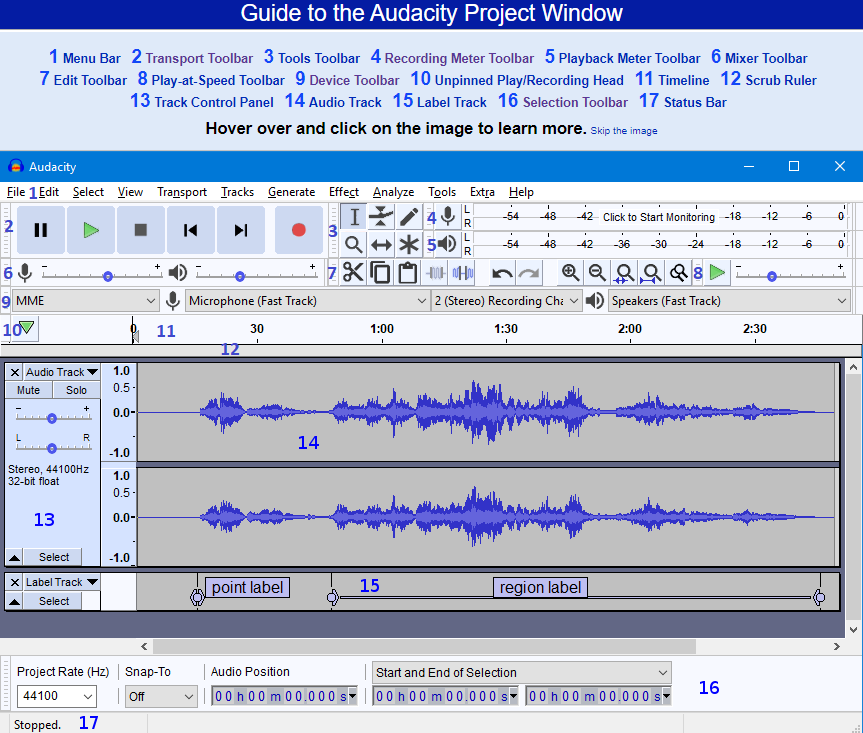
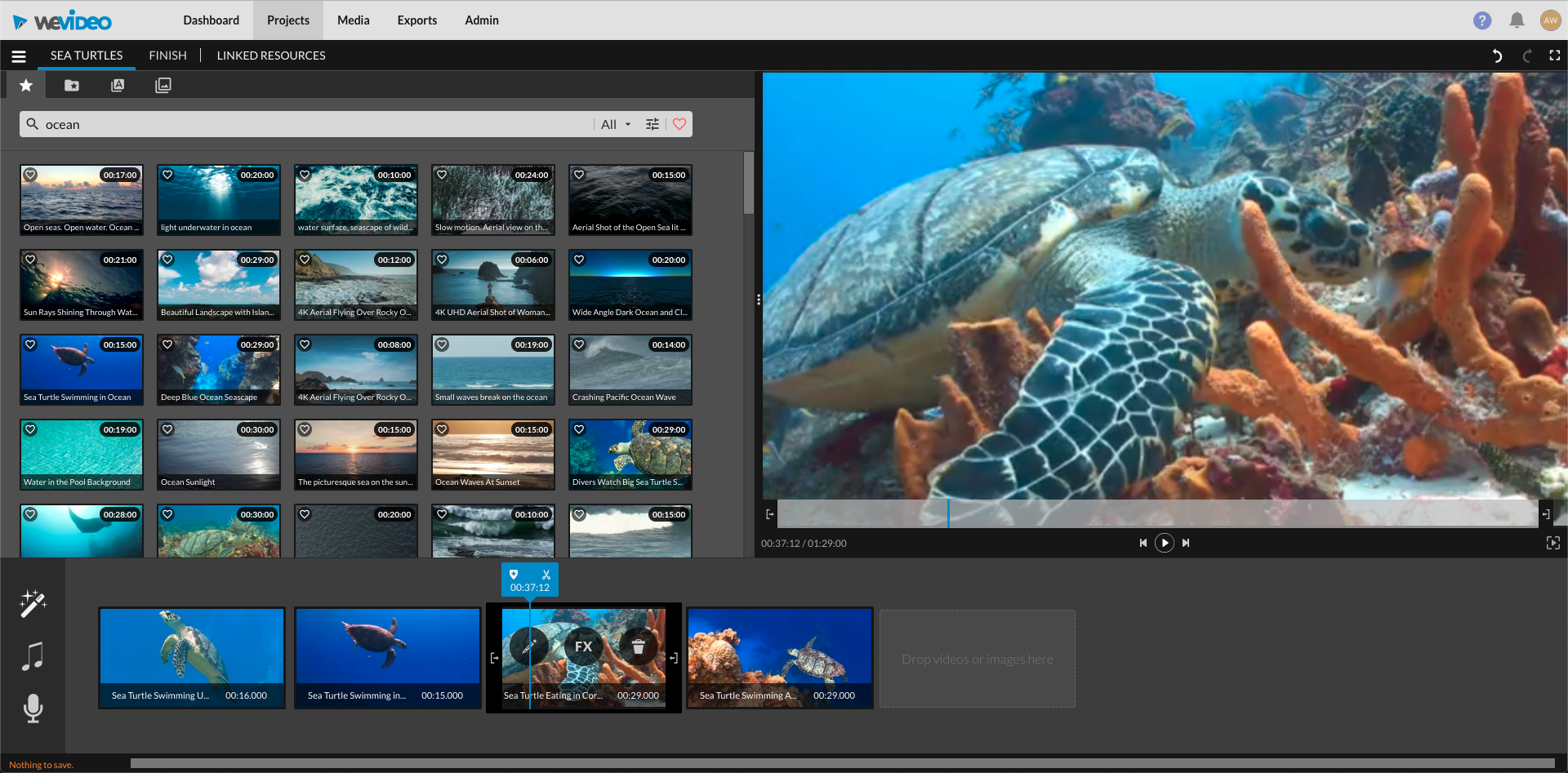
The Podcasting and Digital Stories Intensive is on January 13 and 14, and students may choose to enroll in either our in-person or online group. On Thursday we will consider digital narratives and produce a podcast using Audacity, and on Friday we will continue to hone our storytelling skills and learn videomaking with WeVideo. Each day our workshop will run from 1:00 to 4:30, with an additional optional lunch hour for students on campus. -
-
-
-
Students mustMark as done676.9 KB · Uploaded 01/12/22, 11:38
-
Students mustMark as done56.8 KB · Uploaded 12/3/21, 14:25
-
Students mustMark as done141.6 KB · Uploaded 12/3/21, 14:25
-
Students mustMark as done224.2 KB · Uploaded 12/3/21, 14:25
-
-
Students mustMark as done278.1 KB · Uploaded 01/12/22, 12:03
-
Students mustMark as done
-
Students mustMark as doneScroll down on this page for more self-study resources.
-
-
-
Students mustMark as done
If, when you created your account with your O365 credentials, WeVideo enrolled you in a free account, then enter this code MS5EH9OVVKS9 in your account settings page to join Bryn Mawr's premium license.
-
-
Students mustMark as done3.2 MB · Uploaded 12/3/21, 14:25
-
Students mustMark as done1.1 MB · Uploaded 12/3/21, 14:25
-
-
-
Students mustMark as done
Worktime Challenge:
Create a one minute (can be longer) video on any of the below topics:
- Create a video having just come back from your "dream" vacation.
- Create an advertisement video for a fake product.
- Come up with your own video idea and implement it.
-
-
-
-
Students mustMark as done
Learning objectives
- Identifying your audience
- Choosing a title, format, and length
- Buying recording equipment and software
- Recording and editing your podcast
- Mastering your podcast episodes for distribution
- Publishing your podcast
- Measuring your audience
- Promoting and marketing your podcast
-
Students mustMark as done
Learning objectives
- Downloading and installing Audacity
- Importing audio
- Setting up hardware to record
- Recording two tracks simultaneously
- Basic editing and common effects
- Splitting clips
- Exporting a project
- Inserting silence
- Bleeping unwanted words and sounds
-
Students mustMark as done34.2 MB · Uploaded 12/3/21, 14:25
-
Students mustMark as done
SOFTWARE NOTE: Audacity is installed on all Bryn Mawr-owned computers If you are using your own laptop, download Audacity and an MP3 LAME encoder file, if you wish to save files in this format. To install Audacity, go to http://www.audacityteam.org/ and click the Download button, then launch the installer and follow the prompts.
-
-
-
-
-
-
-
Students mustMark as doneView the “ENGAGE” slides linked above, watching Anisa Ibrahim’s “Still” when prompted. Post your reflections on the video's narrative composition in the Moodle forum. Alternatively, you can attach a story canvas for “Still” to evaluate the design and effect of its story.
-
Students mustMark as done
WATCH: Examples of video stories.
-
-
-
-
-
-
-
-
-
-
-
-
-
-
-
-
-
-
-
-
-
Students mustMark as done
Analyze the style and structure of the narrative. What works well in the composition?
-